June: Distance Learning Favorites
Most kids are out for summer in the month of June. However, I did get some kiddos for virtual distance learning summer school and I am still teaching math (like hardcore math, ya know, coefficients and variables as we speak).
Distance learning in the spring was a bit different from distance learning this summer. As a school, students were assigned work from their core classes on Monday, Wednesday and Friday and then had electives on Tuesday and Thursday. As a 7th grade team at my school, we let zoom be an office hour time that students could come in and ask us any questions.
This summer though is helping me learn and see some realities that could be set into place during the regular school year. Right now, this is our summer school schedule:
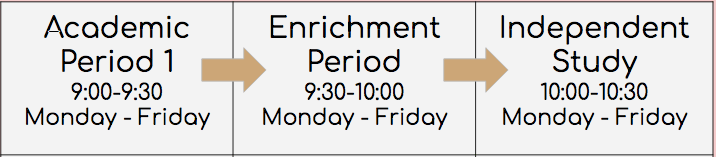
So, the Academic period is either Math/ELA, then Enrichment would be Nutrition/Art/PE (depending on grade level), and Independent Study would be time for students to work by themselves and ask any specific questions about assignments. Really, Independent Study is an office hour but also a 30 minute period where students can recharge for Academic Period 2.
I am trying so many different way to engage with students so I thought that I would share tasks/assignments/activities that they have enjoyed throughout this month:
1. Zoomed In Game
I learned this game from Shawn M Howell on Youtube because I was trying to give students a break from the long math tasks they were doing throughout the week. She made a tutuorial of how to crop the images on zoom. Personally, I did it on google slides and then shared my screen with students. Students really enjoyed it so I think we will play it again this week.
2. Zoom Scavenger Hunt
I’m not too sure if anyone in particular made this game up. I am giving credit to the Oakland Unified School District math support team that taught it to math teachers for our professional development warm up.
The game is a fast paced scavenger hunt that allows students to get to know each other and things they have in their place. We gave students two different options and about 30 seconds to 1 minute to get the item. Then, students do a show and tell of that item. If you are having issues with awkward cameras that are turned off or students who would rather type in the zoom chat, this is a really good low stakes game to get them talking in the audio.

3. Desmos
I learned about Desmos this past year because my coworker was piloting the program for the 8th graders. I didn’t know too much about it other than it was a digital math platform for students. I was lucky enough to be in a district where they offered the opportunity to learn about Desmos with one of their faculty members.
That next week, I started summer classes and I ran into the problem of needing to supplementing knowledge about Ratios and Equivalent Ratios. I wanted to use a hands-on activity, but how does that happen when we’re miles apart from each other? So, I decided to pull up Desmos and created a FREE TEACHER ACCOUNT. Then, I searched Ratios and an activity called “Visual Ratios” came up. There are other activities and opportunities to learn different applications of the program here. I am personally still learning the program but currently I have more pros than cons. I will probably post an update about my usage of Desmos.


4. Flippity.net
I got this resource from a coworker who had learned about it from our school librarian/digital resource warrior. There are multiple applications on this website but my coworkers and I like to use the progress tracker.
Right now, summer school is one of those optional things that students are in because they have parents who want them to still be learning during the summer, which is great! However, we don’t assign grades for summer school and it’s even harder because we aren’t in physical school. We were lucky enough to get some prizes so students would be motivated to turn in assignments each week in summer school. We are currently tracking how many times they attended class or if they turned in the assignment. Students earn one point for each thing and at the end of the week their points are treated like tickets and they get spun on the wheel of names (another Flippity application).
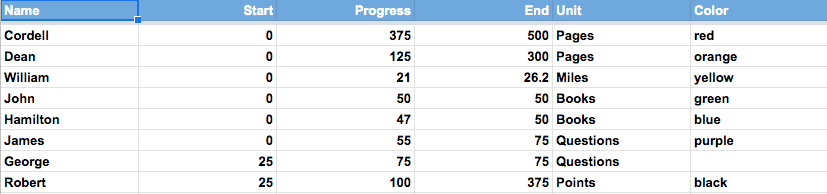

This tracker is made through Google Sheets. There are instructions on the website. The biggest thing is to REMEMBER PUBLISH TO THE WEB. The link will not work unless it is published.

This is all I have for you this round. I will probably update this post at the end of June, but for now this is it.
Best, Miss Raegina
Monthly Favorites desmos favorites june junefavorites new new teacher newteacher teacher zoom

 That Millennial Teacher